Posts

Teaching about the Internet: an Activity for 6th Grade

Image
One of my most favorite topics to teach is the Internet. Many, including adults, think that the Internet and the World Wide Web are two of the same. I typically begin discriminating between the two as young as Kindergarten when they begin to slowly navigate around the World Wide Web via the Internet. It is rather a hard concept for younger students to learn and I love teaching the analogy that the Internet is like the shopping mall, and inside this shopping mall you would find stores like the World Wide Web, email, Instant Messaging, FTP and Newsgroups (amongst others.) In 6th grade we get “connected” to and learn how many users connect to the Internet around the world. This activity is really fun and I would love to share it with you! What you need:  Yarn  Popsicle sticks  These flags here - Please note that this is a Word Document that you can go back and edit when new stats are @ http://www.internetworldstats.com/top20.htm  Glue, tape and laminate to protect those...

Free Typing Website- TypingWeb

Image
If you are like me, and have a very limited budget, you may be finding yourself searching for resources that are free or real cheap to enhance your students' learning experience. I have mentioned several typing Web sites on KCL now and want to introduce you to yet another fantastic resource for your technology toolbox! TypingWeb, located at http://www.typingweb.com/ , “ is a free online typing tutor & keyboarding tutorial for typists of all skill levels. TypingWeb includes entertaining typing games, typing tests, and free official typing certification” {Verbiage taken from the Website itself!} I have been using TypingWeb now for three months to teach my 4th graders how to type and instantly feel in love with this program. Aside from being completely free, it houses a teacher portal where you can easily upload classes to help you assess your student’s typing needs. At the end of each lesson, your student’s also have an option to print out a certificate and play games that enhan...

2nd Grade- Introduction to Microsoft Word

Lesson Name: Microsoft Word Grade: 2 Major Topic: Word Processing Week/Weeks: 5 NETS for Students : 1. Technology Operations and Concepts Students demonstrate a sound understanding of technology concepts, systems, and operations. Materials: Microsoft Word- any version Electronic White Board Computer Projector (if needed) Activity: Week 1- Introduce Microsoft Word: Show how to open/close the program from their desktop Depending on the version of Word you are using, give your students the grand tour of the menu or ribbon. Demonstrate how to type words, change font, and indent. For this intro they need not to worry about spelling or grammatical errors. This week’s Intro Lesson: With Microsoft Word open at each student’s computer, have them type in his or her first and last name. You may have to remind students at this grade to use the shift key to make the first letter in their first and last name capital. Have them highlight their name by clicking and ...

1st Grade Lesson- Using Paint Program to Illustrate Sentence

Image
Lesson Name:Using Paint Program to Illustrate Sentence Grade: 1 Major Topic: Fine motor skills, typing, Drawing, Saving, Printing Week/Weeks: 2 Classes  This is a great review of typing and Windows Paint for your first grade computer class. 1st Grade Lesson- Using Paint Program to Illustrate Sentence {sample} NETS for Students : Basic operations and concepts Students demonstrate a sound understanding of the nature and operation of technology systems. Materials: Whiteboard and projector  Computer Microsoft Paint Motivation: Have this sentence displayed for all to see: "This is what I learned in school…." Activity: Have students open up Windows Paint Program. Show them how to use the typing feature. Have them type the above sentence by stressing the importance of using capital letters. Demonstrate the shift key. Have the students draw a picture on the same page of what they learned in school. Teach them how to send to the printer if this is an op...

Free Online December Holiday Games for Kids

Image
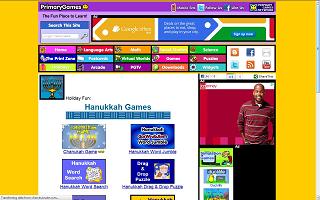
  Enjoy these free online December Holiday Game sites for kids! December is a very cultural rich month covering Kwanzaa, Christmas and Hanukkah. Take time with your class and explore these different traditions by playing online games. Hanukkah Web sites Primary Games The Kidz Page Christmas Web sites Kaboose Northpole.com Primary Games Christmas Billy Bear 4 Kids Kwanzaa Web sites Primary Games- Kwanzaa   The Kidz Page- Kwanzaa

3rd Grade- Learning the Internet with Worksheets and PowerPoint

Image
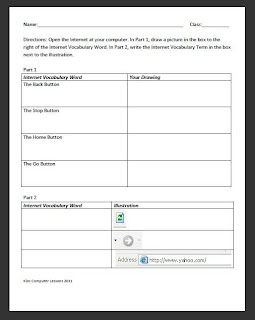
Grade:  3 Major Topic: Typing- Parts of the Internet Week/Weeks: 3-4 classes NETS for Students : 3. Research and Information Fluency Students apply digital tools to gather, evaluate, and use information.  5. Digital Citizenship Students understand human, cultural, and societal issues related to technology and practice legal and ethical behavior. 6. Technology Operations and Concepts   Students demonstrate a sound understanding of technology concepts, systems, and operations.  Materials: Learning the Internet Worksheet Intro to the Internet PowerPoint includes link to the Internet for Kids Class at end of ppt! Parts of the Internet Work Sheet Learning the Internet Worksheet Internet (preferably Internet Explorer)   Whiteboard and projector   Computer Activity: 1. Introduction to the Internet PowerPoint on Day 1. Go through the terms- have the students take notes if deemed worthy. Make sure to have the students type in the link http://www.bcls.lib.nj....

How to implement Study Island when you are just the Computer Teacher

Image
Being a computer teacher has its rewards- one of which is working collaboratively with your coworkers. Study Island can provide just that. Pre-planning to use Study Island (well, the pre-planning on behalf of the classroom teachers that is) in the computer lab can make implementation run more smoothly and build a stronger connection between the classroom lesson and the computer lab. Have the classroom teacher create a test based on what they have been learning about and post it to their class page. The teacher log-in also provides resources for teachers, such as; lesson plans, printables and videos! All of this is available under My Assignments. Please note: that Study Island Provides State Standards for the core within the program. Goal: Develop a strong classroom teacher- computer teacher relationship to make Study Island in the computer lab a success! How and when to implement Study Island in the computer lab? First and foremost,  spend a computer lab class or two introducin...