Posts

Showing posts with the label Internet

Teaching about the Internet: an Activity for 6th Grade

Image
One of my most favorite topics to teach is the Internet. Many, including adults, think that the Internet and the World Wide Web are two of the same. I typically begin discriminating between the two as young as Kindergarten when they begin to slowly navigate around the World Wide Web via the Internet. It is rather a hard concept for younger students to learn and I love teaching the analogy that the Internet is like the shopping mall, and inside this shopping mall you would find stores like the World Wide Web, email, Instant Messaging, FTP and Newsgroups (amongst others.) In 6th grade we get “connected” to and learn how many users connect to the Internet around the world. This activity is really fun and I would love to share it with you! What you need:  Yarn  Popsicle sticks  These flags here - Please note that this is a Word Document that you can go back and edit when new stats are @ http://www.internetworldstats.com/top20.htm  Glue, tape and laminate to protect those...
Free Online December Holiday Games for Kids

Image
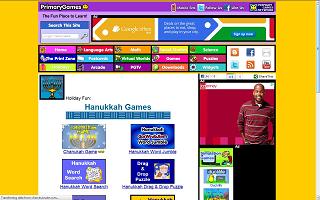
  Enjoy these free online December Holiday Game sites for kids! December is a very cultural rich month covering Kwanzaa, Christmas and Hanukkah. Take time with your class and explore these different traditions by playing online games. Hanukkah Web sites Primary Games The Kidz Page Christmas Web sites Kaboose Northpole.com Primary Games Christmas Billy Bear 4 Kids Kwanzaa Web sites Primary Games- Kwanzaa   The Kidz Page- Kwanzaa

3rd Grade- Learning the Internet with Worksheets and PowerPoint

Image
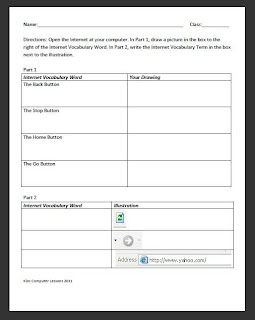
Grade:  3 Major Topic: Typing- Parts of the Internet Week/Weeks: 3-4 classes NETS for Students : 3. Research and Information Fluency Students apply digital tools to gather, evaluate, and use information.  5. Digital Citizenship Students understand human, cultural, and societal issues related to technology and practice legal and ethical behavior. 6. Technology Operations and Concepts   Students demonstrate a sound understanding of technology concepts, systems, and operations.  Materials: Learning the Internet Worksheet Intro to the Internet PowerPoint includes link to the Internet for Kids Class at end of ppt! Parts of the Internet Work Sheet Learning the Internet Worksheet Internet (preferably Internet Explorer)   Whiteboard and projector   Computer Activity: 1. Introduction to the Internet PowerPoint on Day 1. Go through the terms- have the students take notes if deemed worthy. Make sure to have the students type in the link http://www.bcls.lib.nj....

Teaching Kindergartners about the Internet

Image
Teaching Kindergartners about the Internet may be a challenging task, or one that comes more naturally, depending if they are allowed to use the computer at home. In a typical class you may find that it is usually a mixed pot of pro's and newbies. This lesson will give your novice Internet users a chance to explore while you giving you a chance to help the beginners practice. This is also great for their fine-motor skills. Objective: Internet Classes: 2-3 NETS Standards: 5. Digital Citizenship 6. Technology Operations and Concepts Materials: Projector Electronic Whiteboard Computer Internet ABCya! Kindergarten Elementary Pages Preparation: It may be easier to have the Website http://www.abcya.com/kindergarten_computers.htm   on each of your Kindergartner's computers. Motivation: Have the ABCya! Website presented at the front of the computer room. ***Tip*** I usually keep the monitor off until they are ready to work! Activity: 1. Discuss with your class the parts of the Internet...

Learning the Internet for Second Grade with worksheets

Image
Major Topic: URL’s and search engines Week/Weeks: 2-3 classes NETS for Students: 3. Research and Information Fluency Students apply digital tools to gather, evaluate, and use information. Students: a. Plan strategies to guide inquiry. b. Locate, organize, analyze, evaluate, synthesize, and ethically use information from a variety of sources and media. c. Evaluate and select information sources and digital tools based on the appropriateness to specific tasks. d. Process data and report results. 6. Technology Operations and Concepts   Students demonstrate a sound understanding of technology concepts, systems, and operations. Students:   a. Understand and use technology systems. Materials: Whiteboard and projector Computer with Microsoft PowerPoint or a .ppt reader on it Basic Internet for 2 nd Grade PowerPoint URL Checklist Worksheet Internet Search Engine Worksheet   Motivation: Have the PowerPoint, Basic Internet for ...

Tech Talk: The Internet vs. The World Wide Web

Do your students continuously interchange the terms "Internet" and "World Wide Web"? They are not synonymous! Teach your students the difference between the two! Great informational sites include: Webopedia How Stuff Works Diffen Quick project ideas: Use Inspiration or Kidspiration Software to visually map out the differences between the two. Use PowerPoint to create a slideshow. Divide the class into two- one half will create facts about the Internet and the other about the World Wide Web. Create a Spreadsheet or Word Document listing the differences between the Internet and World Wide Web.