Posts

First Grade- Windows Paint and Self-Portraits

Image
Major Topic: Mouse, Microsoft Paint Week/Weeks: 3 classes NETS for Students: 1. Creativity and Innovation   Students demonstrate creative thinking, construct knowledge, and develop innovative products and processes using technology. Students: a. apply existing knowledge to generate new ideas, products, or processes. b. create original works as a means of personal or group expression. c. use models and simulations to explore complex systems and issues. d. identify trends and forecast possibilities. 6. Technology Operations and Concepts   Students demonstrate a sound understanding of technology concepts, systems, and operations. Students:   a. understand and use technology systems. b. select and use applications effectively and productively. c. troubleshoot systems and applications. d. transfer current knowledge to learning of new technologies. Materials: Projector and whiteboard Mi...
First Grade- Computer Parts Worksheet and Student Login

Image
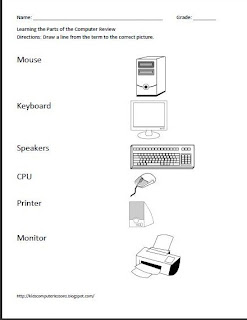
First Grade- Computer Parts Worksheet and Student Login- Sample Worksheet Grade: 1 Major Topic: Computer Hardware, logging into the computer Week/Weeks: 1 class Mrs. Bloom NETS for Students: Basic operations and concepts Students demonstrate a sound understanding of the nature and operation of technology systems. Motivation: Have students sit in a group and play a game called “Simon Says” and have them take turns finding a part of the computer. “Simon Says, [child’s name] find me the monitor!” This is a great way to learn your students’ names! Materials: Pencil Computer Parts Worksheet Computer Activity: Discuss directions and have students complete the computer parts worksheet as per directions. Computer activity: On the whiteboard at the front of the class, have the first grade student sign in and password displayed. Teach them how to log in and out of their computer by demonstrating first and then walking them through the process ste...

Kindergarten- Learning the Parts of the Computer with Worksheet

Image
Kindergarten- Learning the Parts of the Computer with Worksheet Grade: Kindergarten Major Topic: Computer Hardware Week/Weeks: 1 class NETS for Students: Basic operations and concepts Students demonstrate a sound understanding of the nature and operation of technology systems.   Materials: Computer Parts Worksheet Crayons Paint program such as Microsoft Paint- open. Motivation: Have students sit in a group and play a game called “Simon Says” and have them take turns finding a part of the computer. “Simon Says, [child’s name] find me the monitor!” This is a great way to learn your students’ names! Procedure: Discuss directions and have students complete the computer parts worksheet (1AComputerPartsWS). Color as per directions. If time permits, have a paint program open for them to practice their mouse skills. Allowing free time in this program will help you assess who will need extra help in the beginning and who may already understa...

Website Spotlight: ABCya.com

Image
    ABCya.com is a a great resource for elementary computer and classroom teachers to have. I used this Web site a lot when I introduced the Internet to young children. It is very easy to navigate and teaches children how to use the forward and back button as well as the "X" that closes out a window. More importantly it is a great way to reinforce mouse manipulation- and it's fun! Great Resources for Computer Education: Kindergarten - 2nd Grade  Computer Vocabulary: Find the Technology Learn ABCya.com's Buttons Color, Draw & Paint 3rd - 5th Grade Computer Input and Output Devices Make an Animation Aside that, ABCya.com offers educational games in language arts and math. From  ABCya.com "All children's educational computer activities were created or approved by certified school teachers. All educational games are free and are modeled from primary grade lessons and enhanced to provide an interactive way for children to learn." I strongly suggest t...

Intro to the Computer Class: Kindergarten

Image
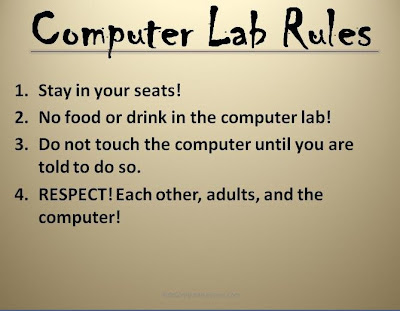
For some computer educators, Kindergarten marks the beginning of a students career in technology. If you are amongst the lucky to have this privilege- embrace it- for they are clean slates and are eager to learn. If you do have a 5 or 6 year old child enrolled in your computer education classes, you may be asking yourself the question "what do I teach to these young children in regards to computer education?" Look no further than here my friend! Your first computer class with these children is going to be your most challenging yet. Why you ask? Simple, they want to learn how to play the computer and they want to play it NOW! However, there are basics to cover. First and foremost you want to introduce yourself, and make them feel at home. Then you want to introduce the computer lab so they become familiar with his or her surroundings. Go around the room and ask them who they are.  Lastly, you want to introduce Computer Lab Rules so they are aware of what is expected from them....

Typing for Young Children: Dance Mat Typing

I firmly believe that typing is a necessary skill set that all children should achieve and think that it is never too early to start. Just how pre-writing and pre-drawing skills develop over time, typing should follow the same course. By second grade your students should begin to learn the correct placement of his hands on the keyboard. I have used the  Dance Mat Typing Web site with my late first grade and second grade students for years. I understand that there are a lot of great typing programs out there-however,  I found this one to be very fun and exciting for the age group. It keeps them involved the entire time! Grades: End of 1st grade- 2nd Grade Class Time: Continuous NETS: 6. Technology Operations and Concepts Students demonstrate a sound understanding of technology concepts, systems, and operations. Students: a. understand and use technology systems. b. select and use applications effectively and productively. c. troubleshoot systems and applicatio...

Introduction to the Letters on the Keyboard

Image
Younger children who have just learned their ABC's in order, may have a hard time understanding, let alone memorizing the QWERTY Keyboard. This lesson is a fun way to learn basic keyboarding skills while revisiting the letters of the alphabet. At this age, you only want them to be comfortable at the keyboard- they soon will be proficient typists! For Grades: preschool-first grade Class time: 1 Class NETS Standards "6. Technology Operations and Concepts Students demonstrate a sound understanding of technology concepts, systems, and operations." Materials: Printable QWERTY Letters (PDF) Keyboard Optional: Electronic Whiteboard and Computer   Procedure: Prep: Print out and place the letters in QWERTY order on the floor in your computer lab. If you have tight space, a hallway would suffice. I would also suggest laminating the QWERTY letters. 1. Discuss the Keyboard while students are sitting at their seats. Point out that the letters are NOT in alphabetical order. I...